Schreiben. Assemblieren. Debuggen. Disassemblieren.
Write. Assemble. Debug. Disassemble.
Zwei kleine, portable Programme statt einer Werkzeugkette: Asmonite zum Schreiben, Übersetzen und Debuggen von Assembler (x86, x64, ARM Thumb-2 und ARM64), Dismonite zum Untersuchen und Debuggen fertiger Programme – Windows (PE für x86, x64, ARM und ARM64), DOS (MZ) und ARM-Linux (ELF). Mit eingebauter Befehlsinfo auf F1. Entpacken, starten, fertig.
Two small, portable programs instead of a tool chain: Asmonite to write, assemble and debug assembly (x86, x64, ARM Thumb-2 and ARM64), Dismonite to examine and debug finished programs – Windows (PE for x86, x64, ARM and ARM64), DOS (MZ) and ARM Linux (ELF). With built-in instruction info on F1. Unpack, start, done.
Version 0.5.0 (Testversion) · Windows 10/11 · 2.0 MB · keine Installation · kostenlos · kein Tracking
Version 0.5.0 (test version) · Windows 10/11 · 2.0 MB · no installation · free · no tracking
Alles, was man zum Schreiben, Übersetzen, Debuggen und Zurückübersetzen von Assembler-Programmen braucht.
Everything you need to write, assemble, debug and disassemble assembly programs.
Syntax-Hervorhebung für x86-Assembler, C und Pascal. Strg+F9 erzeugt die EXE neben der Quelldatei; Fehler stehen im Ausgabefenster.
Syntax highlighting for x86 assembly, C and Pascal. Ctrl+F9 builds the EXE next to the source file; errors appear in the output window.
AsmoniteJede erzeugte EXE wird vor dem Start geprüft: Header, Sections, Einsprungpunkt, Importe – gibt es die DLLs und Funktionen wirklich?
Every generated EXE is checked before it starts: header, sections, entry point, imports – do the DLLs and functions really exist?
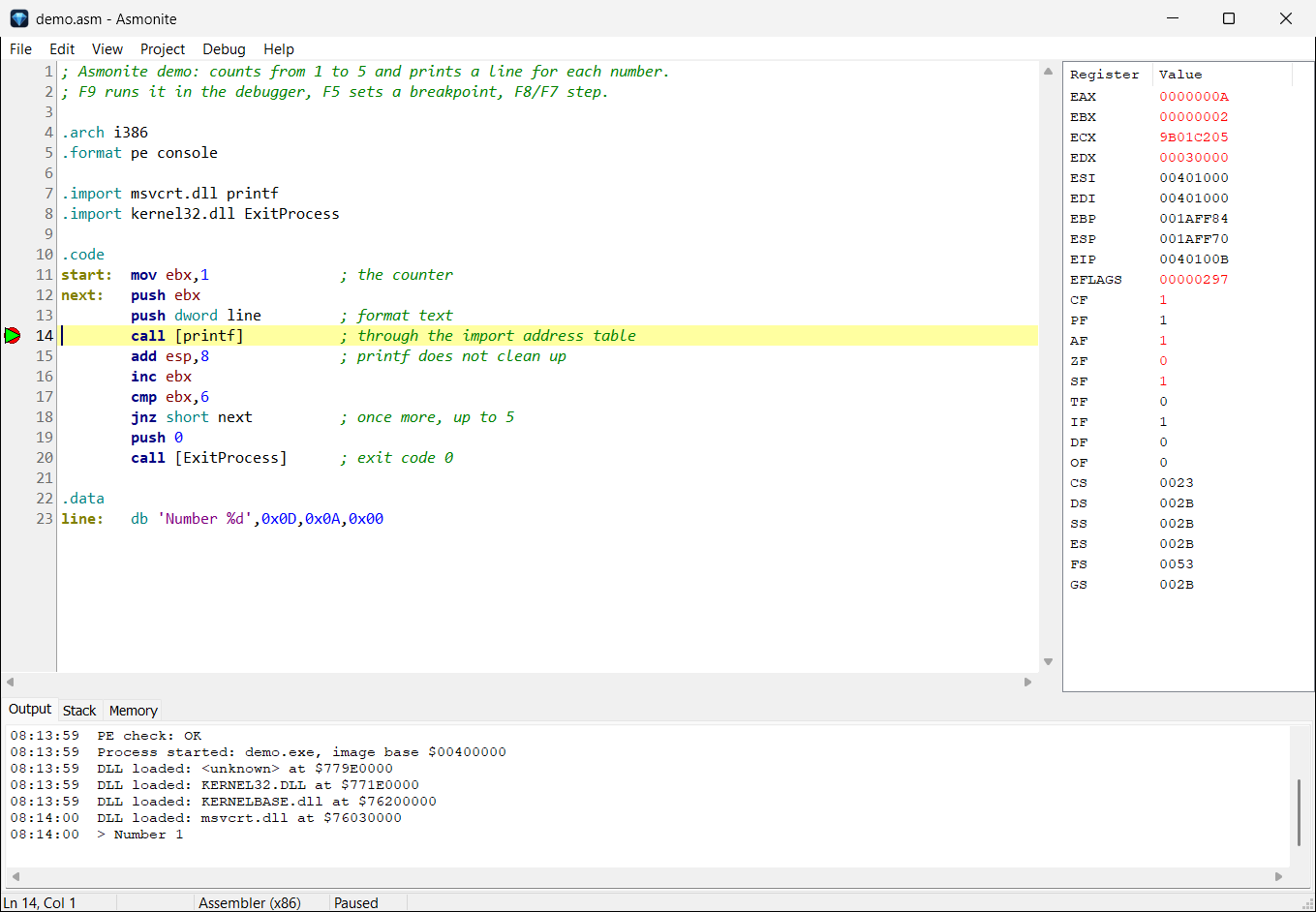
AsmoniteHaltepunkte, Step Over/Into, Run to Cursor, Pause – direkt im Quelltext. Register, Stack und Speicher; die Ausgabe des Programms live.
Breakpoints, step over/into, run to cursor, pause – right in the source. Registers, stack and memory; the program's output live.
AsmoniteDOS-Programme laufen in QEMU mit FreeDOS – mit denselben Debug-Befehlen. QEMU startet automatisch; ein zweiter Lauf braucht kein neues Booten.
DOS programs run in QEMU with FreeDOS – with the same debug commands. QEMU starts automatically; a second run needs no new boot.
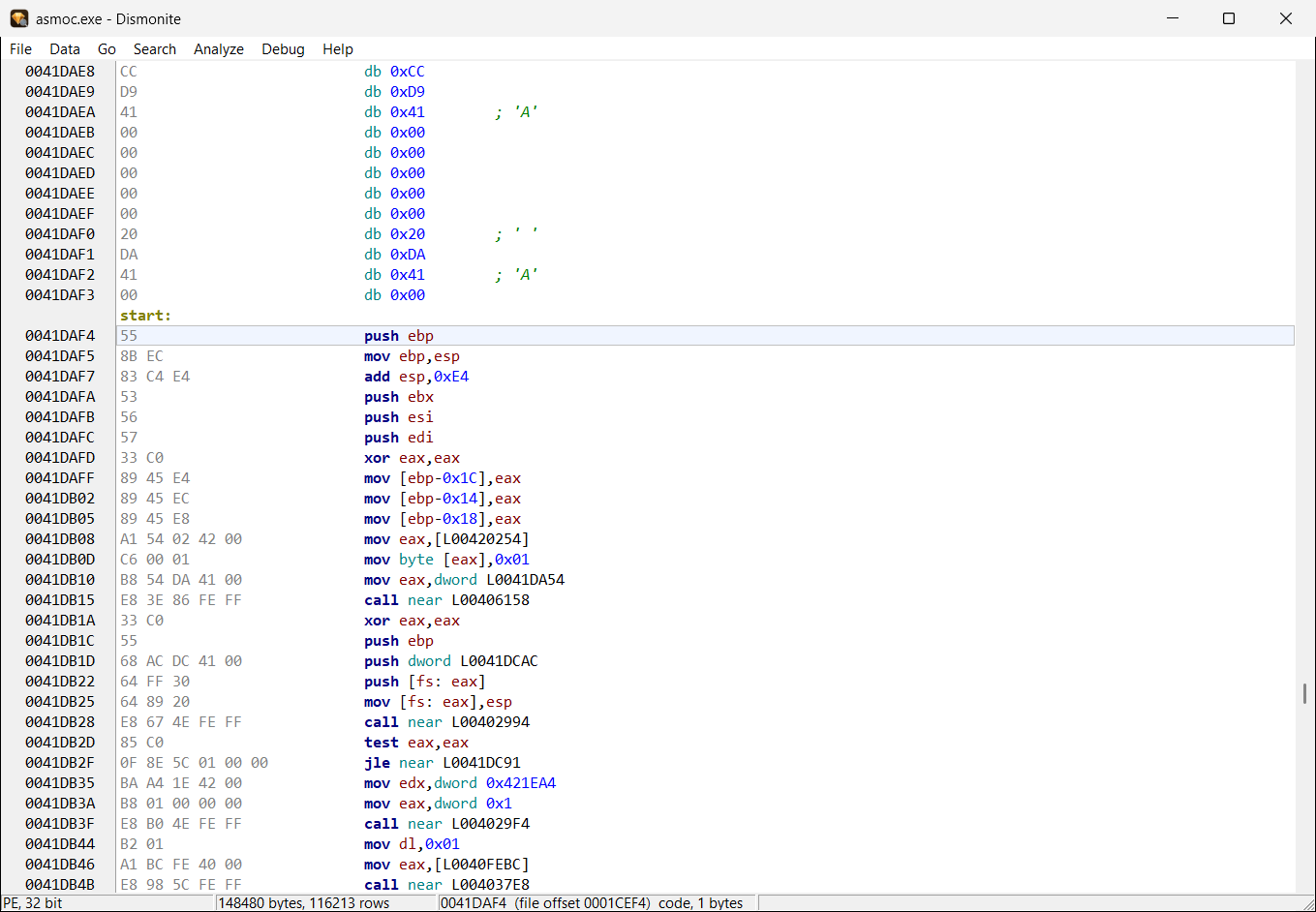
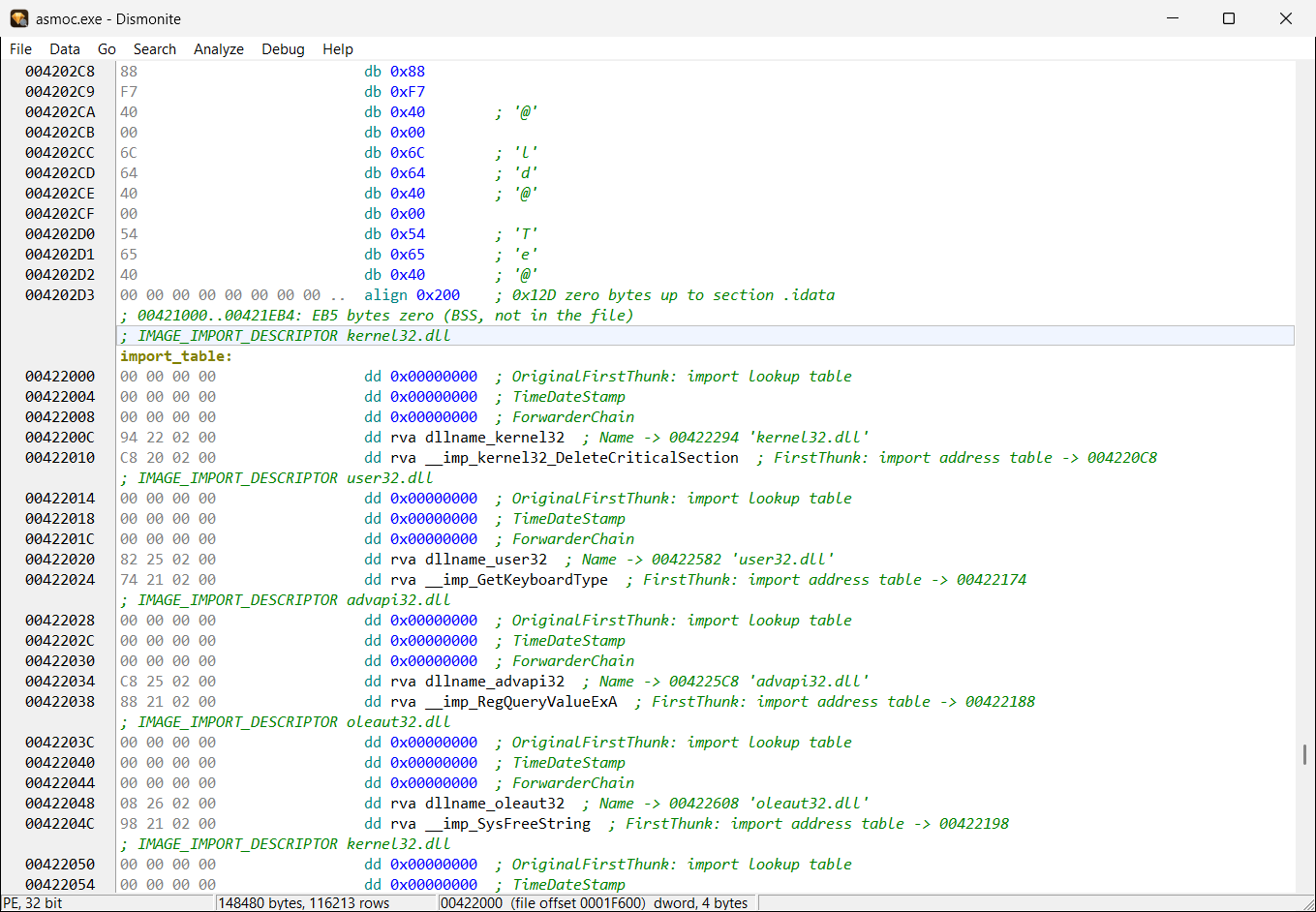
Asmonite · DismonitePE-, MZ- und ELF-Dateien analysieren, kommentieren und als .asm exportieren, das wieder Byte für Byte dieselbe Datei ergibt.
Analyze, comment and export PE, MZ and ELF files as .asm that assembles back into the same file, byte for byte.
32-Bit-ARM-Programme laufen über gdbserver in Raspberry Pi OS unter QEMU. Ein Skript lädt und richtet den Gast ein; Dismonite startet ihn auf Wunsch.
32-bit ARM programs run through gdbserver in Raspberry Pi OS under QEMU. A script downloads and sets up the guest; Dismonite starts it on request.
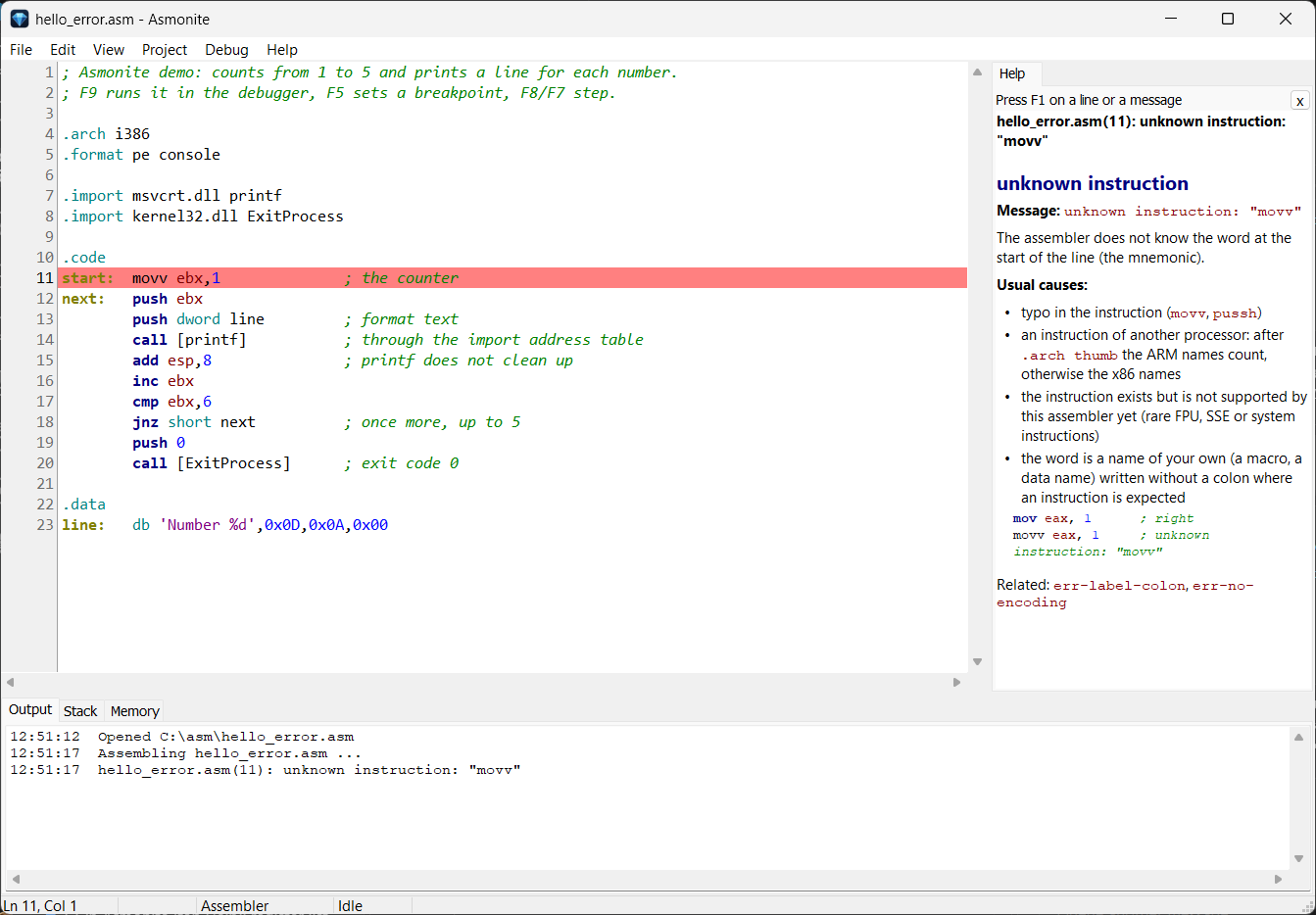
DismoniteEin Tastendruck erklärt den Befehl, die importierte Windows-Funktion (mit Parametern), den DOS-Interrupt, die Direktive – und auch Fehlermeldungen. Deutsch und Englisch.
One key press explains the instruction, the imported Windows function (with its parameters), the DOS interrupt, the directive – and error messages too. German and English.
Asmonite · DismoniteAb .arch thumb schreibt Asmonite ARM-Thumb-2-Code; der Editor färbt ihn als ARM. Dismonite exportiert Windows-on-ARM-Programme als .asm, das wieder dieselbe Datei ergibt.
After .arch thumb Asmonite writes ARM Thumb-2 code; the editor colours it as ARM. Dismonite exports Windows on ARM programs as .asm that assembles back into the same file.
Dismonite startet 32-Bit-ARM-Programme auf einem echten Windows-on-ARM-Rechner und debuggt sie dort: Haltepunkte, Schritte, Register. Der kleine Server asmodbg läuft auf dem ARM-Rechner.
Dismonite runs 32-bit ARM programs on a real Windows on ARM computer and debugs them there: breakpoints, steps, registers. The small server asmodbg runs on the ARM computer.
Ab .arch x64 oder .arch arm64 schreibt Asmonite 64-Bit-Code; .format pe erzeugt eine PE32+-Datei, die Windows (x64) oder Windows on ARM64 ausführt. Jedes Ergebnis wird zur Kontrolle wieder zurückgelesen.
After .arch x64 or .arch arm64 Asmonite writes 64-bit code; .format pe makes a PE32+ file that Windows (x64) or Windows on ARM64 runs. Every result is read back to check it.
x64-Programme laufen auf diesem Rechner, ARM64-Programme auf einem Windows-on-ARM-Rechner (ssh, direkt im Netz oder lokal): Haltepunkte, Schritte, 64-Bit-Register, Stack und Speicher – in Asmonite auf Quellzeilen. Vor einem Sprung steht, ob er genommen wird und wohin.
x64 programs run on this computer, ARM64 programs on a Windows on ARM computer (ssh, directly on the network or locally): breakpoints, steps, 64-bit registers, stack and memory – in Asmonite on source lines. Before a jump the row says whether it is taken and where to.
Asmonite · DismoniteDismonite liest das Ressourcenverzeichnis von PE-Dateien: Zeichenketten-Tabellen werden Text für Text erkannt, mit Label und Nummer; eine Konstante vor einem Aufruf, der eine Meldung lädt, zeigt den Text als Hinweis.
Dismonite reads the resource directory of PE files: string tables are recognized text by text, with a label and a number; a constant before a call that loads a message shows the text as a hint.
Dismonite| Läuft auf (Host) | Programme, die man damit baut oder untersucht (Ziel) | |
|---|---|---|
| Runs on (host) | Programs you build or examine with it (target) | |
| Asmonite | Windows 10/11, 32 oder 64 Bit | Windows (PE, PE32+) aus i386-, x64- und ARM64-Assembler; DOS-Programme in QEMU; ARM-Thumb-2-Code schreiben |
| Asmonite | Windows 10/11, 32 or 64 bit | Windows (PE, PE32+) from i386, x64 and ARM64 assembly; DOS programs in QEMU; write ARM Thumb-2 code |
| Dismonite | Windows 10/11, 32 oder 64 Bit | Windows PE (x86, x64, ARM, ARM64), DOS MZ (16 Bit), ARM-Linux ELF (32 Bit) |
| Dismonite | Windows 10/11, 32 or 64 bit | Windows PE (x86, x64, ARM, ARM64), DOS MZ (16-bit), ARM Linux ELF (32-bit) |
| asmodbg | Windows 10 auf ARM (läuft dort, wo das ARM-Programm läuft) | 32-Bit-ARM-Programme (PE), vom Dismonite im Netz oder über ssh gesteuert |
| asmodbg | Windows 10 on ARM (runs where the ARM program runs) | 32-bit ARM programs (PE), controlled by Dismonite over the network or ssh |
| asmodbg64 | Windows on ARM64 (läuft dort, wo das ARM64-Programm läuft) | ARM64-Programme (PE), von Asmonite und Dismonite über ssh oder im Netz gesteuert |
| asmodbg64 | Windows on ARM64 (runs where the ARM64 program runs) | ARM64 programs (PE), controlled by Asmonite and Dismonite over ssh or the network |
| asmodbgx64 | 64-Bit-Windows (Hilfsprogramm im Ordner debugserver, startet von selbst) | x64-Programme (PE32+) auf diesem Rechner oder, mit --listen, auf einem anderen 64-Bit-Windows-Rechner im Netz |
| asmodbgx64 | 64-bit Windows (helper in the debugserver folder, starts by itself) | x64 programs (PE32+) on this computer or, with --listen, on another 64-bit Windows computer in the network |
| QEMU | 64-Bit-Windows (nur für DOS und ARM nötig; die Skripte bieten die Installation an) | FreeDOS (720-KB-Diskette), Raspberry Pi OS Buster (ARM) |
| QEMU | 64-bit Windows (only needed for DOS and ARM; the scripts offer to install it) | FreeDOS (720 KB floppy), Raspberry Pi OS Buster (ARM) |
Für alle, die verstehen wollen, was der Prozessor wirklich tut – vom ersten mov bis zur fremden EXE.
For everyone who wants to understand what the processor really does – from the first mov to someone else's EXE.
asmoc für die Kommandozeileasmoc for the command line.asm.asmVom ZIP zum ersten Haltepunkt – mit dem mitgelieferten Beispiel.
From the ZIP to the first breakpoint – with the example that comes with it.
Asmonite.exe starten. Keine Installation; Datei > Öffnen beginnt im Programmordner.examples\demo.asm öffnen. Ein kleines Programm: zählt von 1 bis 5 und ruft printf auf.call [printf] setzen.printf mit seinen Parametern – rechts in der Hilfe.Asmonite.exe. No installation; File > Open starts in the program's folder.examples\demo.asm. A small program: counts from 1 to 5 and calls printf.call [printf].printf with its parameters – in the help on the right.Es geht auch ohne Vorbereitung: In einer neuen Datei genügt die eine Zeile mov eax, 1 – Strg+F9 macht daraus ein Windows-Programm (ohne .arch und .format nimmt Asmonite 32-Bit-Windows an).
It works without preparation too: in a new file the single line mov eax, 1 is enough – Ctrl+F9 makes a Windows program of it (without .arch and .format Asmonite assumes 32-bit Windows).
Danach: examples\demo.exe in Dismonite öffnen und mit F7 dieselbe Datei ohne Quelltext debuggen.
Next: open examples\demo.exe in Dismonite and debug the same file without source with F7.
Asmonite – der EditorAsmonite – the editorÜbersichtlich, schnell und auf Assembler zugeschnitten.
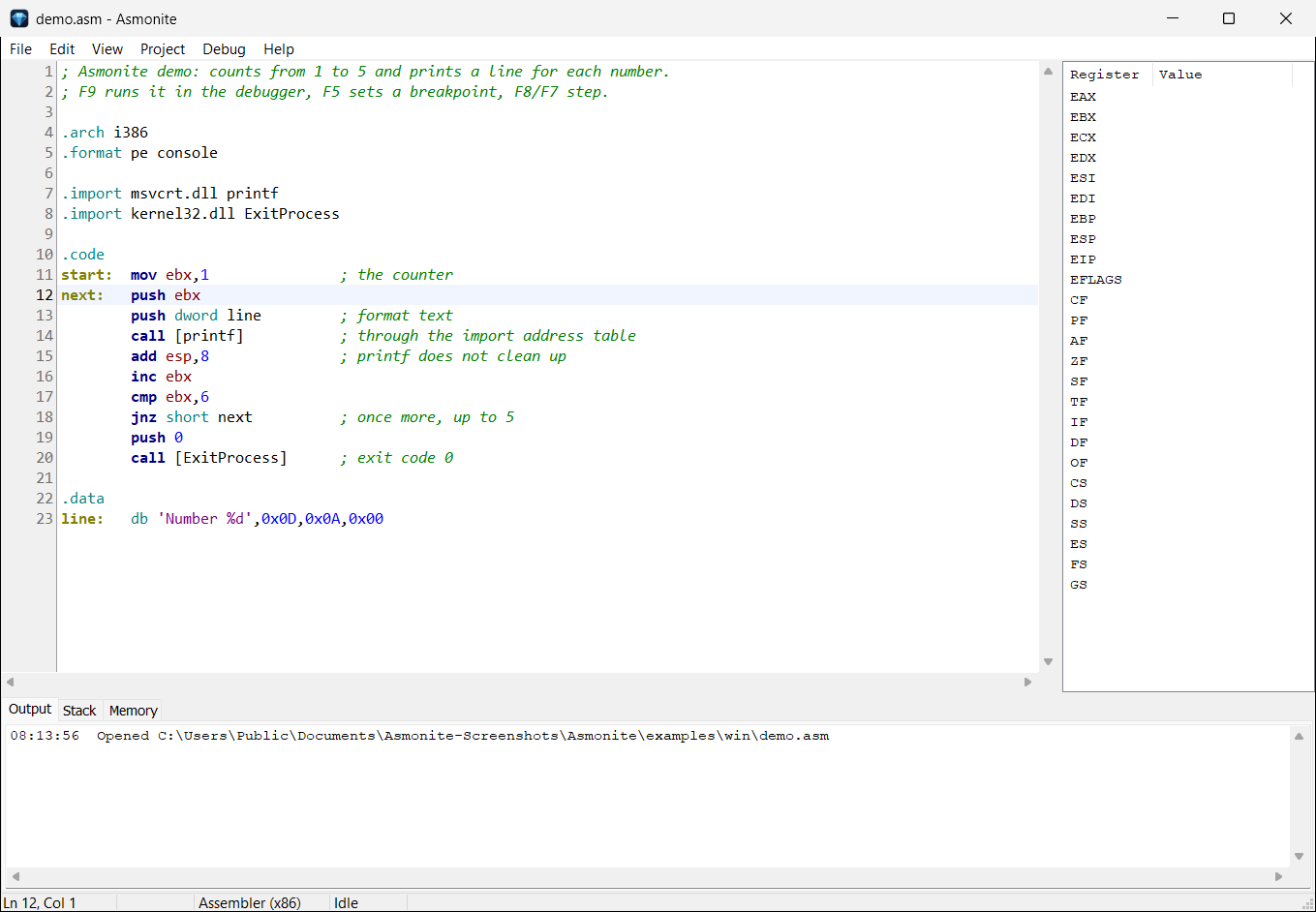
Clean, fast and tailored to assembly.
.arch thumb färbt der Editor die Zeilen als ARM.arch thumb the editor colours the lines as ARM.format pe erzeugt Header und Importtabelle, oder jedes Byte selbst im Quelltext.format pe generates header and import table, or write every byte yourself
printf über die Importtabelle.
The editor with a small program: a loop, a call of printf through the import table.
Schritt für Schritt durch das eigene Programm – mit Register, Stack und Speicher im Blick.
Step through your own program – with registers, stack and memory in view.
esp/ebp/eipesp/ebp/eiphello.com.asm und hello_exe.asm – Hello World als .COM und als .EXE, mit Erklärung des Unterschiedshello.com.asm and hello_exe.asm – Hello World as .COM and as .EXE, with an explanation of the difference.arch x64 startet mit F9 auf diesem Rechner, mit .arch arm64 auf einem Windows-on-ARM-Rechner.arch x64 starts with F9 on this computer, one with .arch arm64 on a Windows on ARM computerrax…r15 bzw. x0…x30 mit Flags, Stack als 64-Bit-Werte, Speicher mit 64-Bit-Adressenrax…r15 or x0…x30 with flags, stack as 64-bit values, memory with 64-bit addressesEin Tastendruck erklärt, was die Zeile unter dem Cursor tut – ohne Handbuch, ohne Suchmaschine.
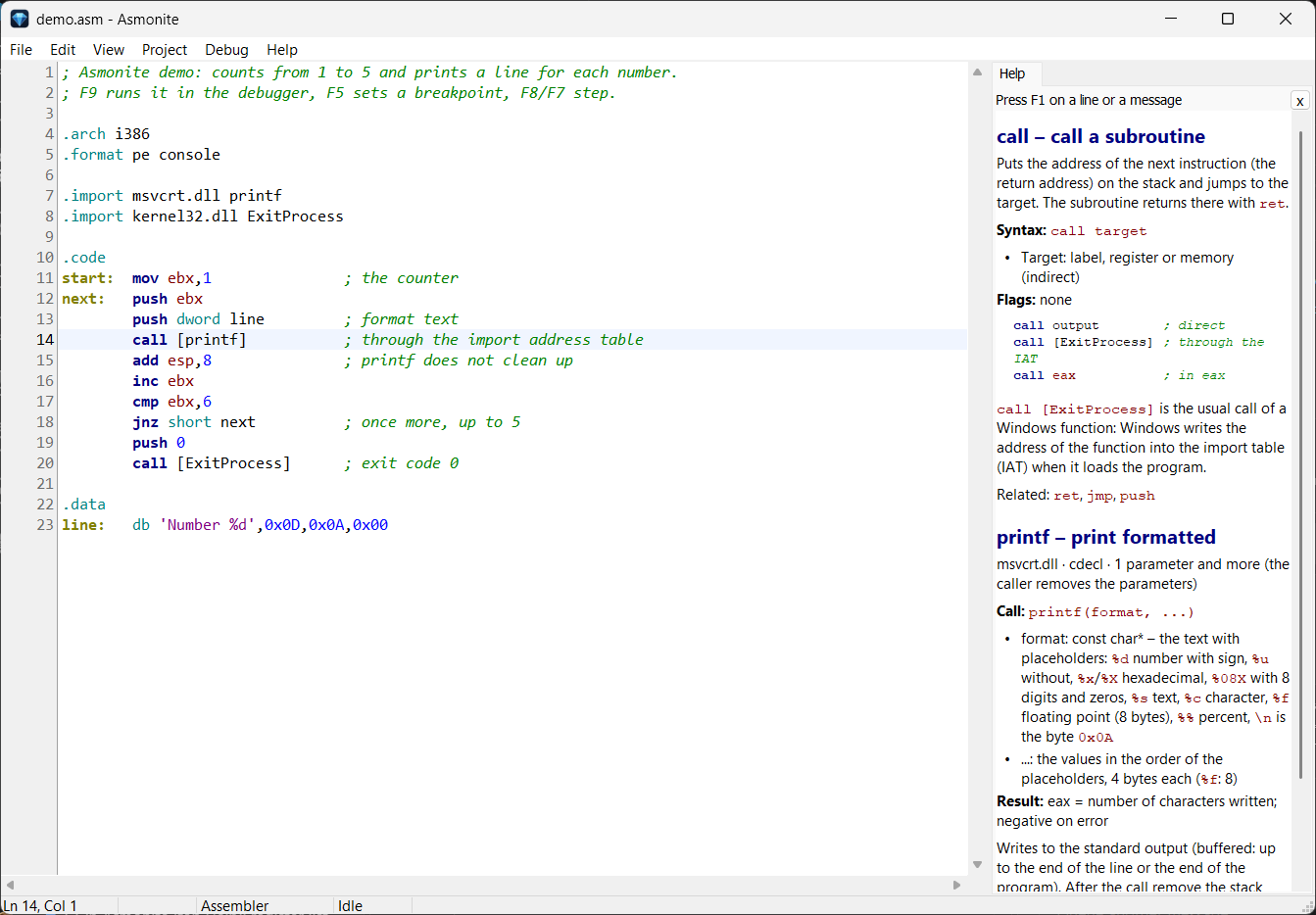
One key press explains what the line under the cursor does – no manual, no search engine.
call [ExitProcess] die DLL, die Aufrufkonvention, jeden Parameter mit Typ und Bedeutung und das Ergebnis – über 230 Funktionen (kernel32, user32, msvcrt …)call [ExitProcess] the DLL, the calling convention, every parameter with type and meaning and the result – over 230 functions (kernel32, user32, msvcrt …)int 21h die Funktion, deren Nummer die Info in den Zeilen davor findet, mit Ein- und Ausgaberegisternint 21h the function, whose number the info finds in the lines before, with input and output registers.arch, .format, .import, section und die anderen Besonderheiten des Assemblers.arch, .format, .import, section and the other peculiarities of the assembler
call [printf]: rechts der Befehl call und die Funktion printf – DLL, Aufrufkonvention, Parameter, Ergebnis.
F1 on call [printf]: on the right the instruction call and the function printf – DLL, calling convention, parameters, result.
Dismonite – Disassembler und DebuggerDismonite – disassembler and debuggerFertige Programme verstehen, im Debugger beobachten und wieder in Quelltext verwandeln – für Windows (PE: x86, x64, ARM, ARM64), DOS (MZ) und ARM-Linux (ELF).
Understand finished programs, watch them in the debugger and turn them back into source – for Windows (PE: x86, x64, ARM, ARM64), DOS (MZ) and ARM Linux (ELF).
Dismonite hat eine eigene Seite: dismonite.com
Dismonite has a page of its own: dismonite.com
str_<Nummer>; im Code zeigt eine Konstante vor einem Aufruf, der eine Meldung lädt, den Text als Hinweisstr_<number>; in the code a constant before a call that loads a message shows the text as a hint<programm>.dmon neben dem Programm gespeichert<program>.dmon next to the program.asm mit Labels, den der Asmonite-Assembler wieder zur selben Datei übersetzt.asm with labels, which the Asmonite assembler turns into the same file again
start, Sprungziele und Adressen als Labels.
After the analysis: the code at the entry point start, jump targets and addresses as labels.
align.
The import table: every field with its size and name, RVAs as labels, padding as one align line.
Startet das Programm direkt unter Windows. Haltepunkte, Step Over/Into, Run to Cursor, Pause; die Konsole des Programms erscheint in der Ausgabe.
Starts the program directly on Windows. Breakpoints, step over/into, run to cursor, pause; the program's console appears in the output view.
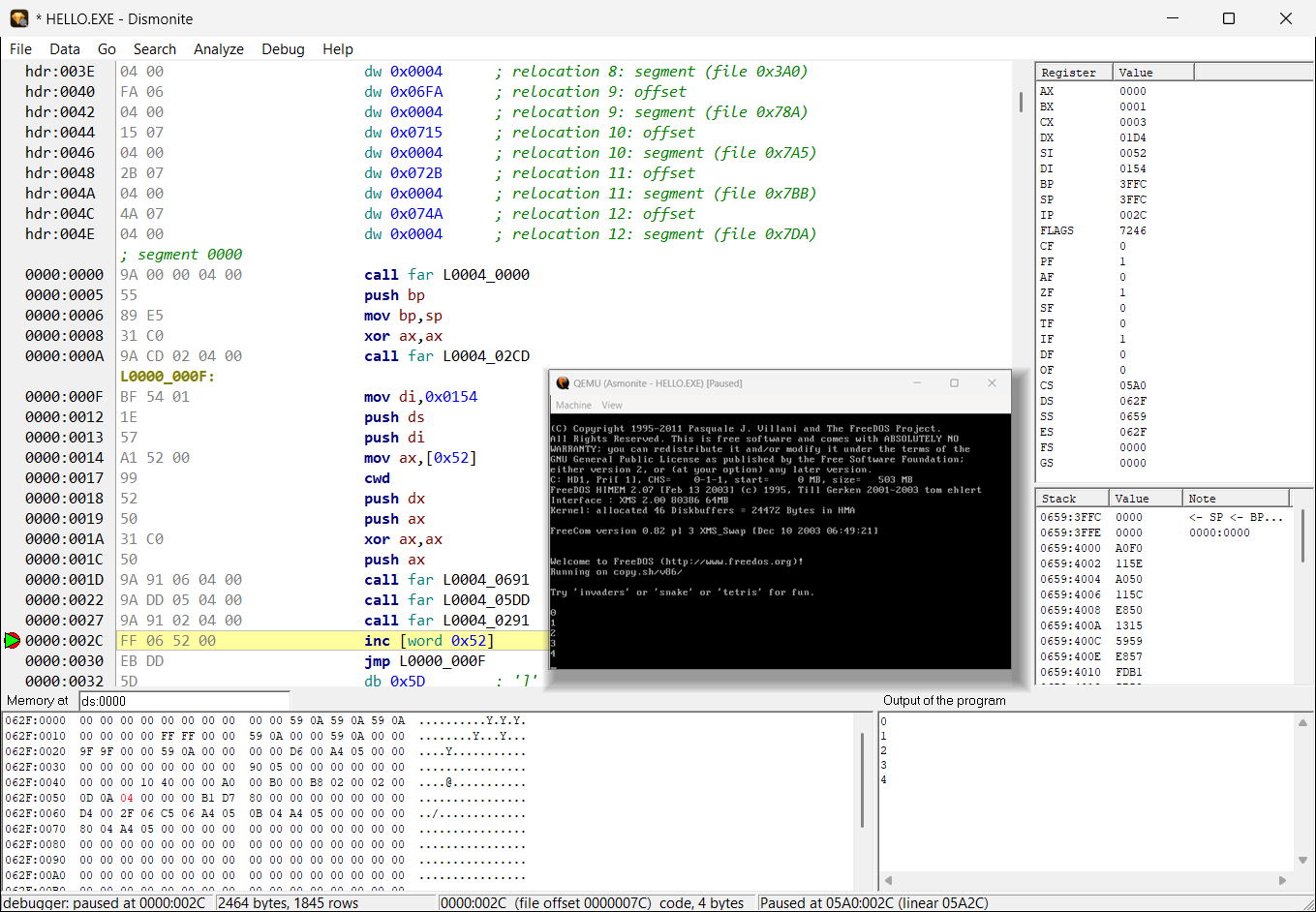
Startet QEMU mit FreeDOS von selbst; 16-Bit-Register, Adressen als Segment:Offset. Ein zweiter Lauf startet im laufenden QEMU.
Starts QEMU with FreeDOS by itself; 16-bit registers, addresses as segment:offset. A second run starts in the running QEMU.
Lädt das Programm per ssh in den Raspberry-Pi-Gast und debuggt es über gdbserver. Läuft kein Gast, startet Dismonite ihn nach Rückfrage.
Copies the program into the Raspberry Pi guest over ssh and debugs it through gdbserver. If no guest runs, Dismonite asks and starts it.
Kopiert das 32-Bit-ARM-Programm auf einen echten Windows-on-ARM-Rechner und debuggt es dort über den kleinen Server asmodbg – entweder über ssh oder direkt im Netz mit einem Kopplungscode. „Search LAN“ findet laufende Server im lokalen Netz.
Copies the 32-bit ARM program to a real Windows on ARM computer and debugs it there through the small server asmodbg – either over ssh or directly on the network with a pairing code. “Search LAN” finds running servers on the local network.
Startet das 64-Bit-Programm auf diesem Rechner; das kleine Hilfsprogramm asmodbgx64 läuft als Kindprozess. Register rax…r15, Stack und Speicher mit 64-Bit-Adressen.
Starts the 64-bit program on this computer; the small helper asmodbgx64 runs as a child process. Registers rax…r15, stack and memory with 64-bit addresses.
Debuggt auf einem Windows-on-ARM-Rechner über den Server asmodbg64 – ssh, direkt im Netz oder lokal, wenn Dismonite selbst dort läuft. Register x0…x30, sp, pc, Flags.
Debugs on a Windows on ARM computer through the server asmodbg64 – ssh, directly on the network or locally if Dismonite itself runs there. Registers x0…x30, sp, pc, flags.
.dmon gespeichert.dmon
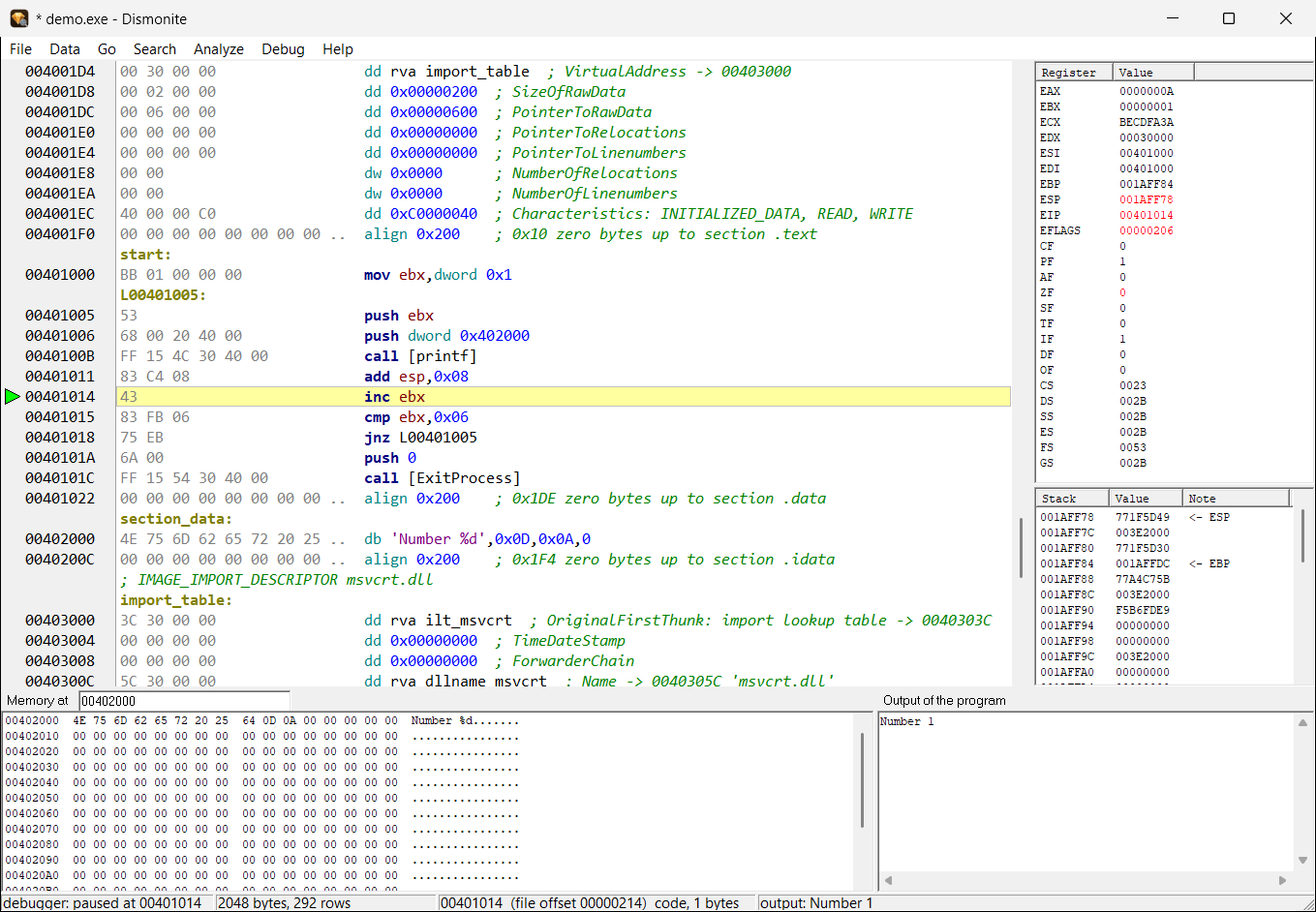
demo.exe ohne Quelltext im Debugger – angehalten nach dem ersten printf: rechts Register und Stack, unten der Speicher der Daten-Section und die Ausgabe „Number 1“.
Windows: demo.exe in the debugger without source – stopped after the first printf: registers and stack on the right, below the memory of the data section and the output “Number 1”.
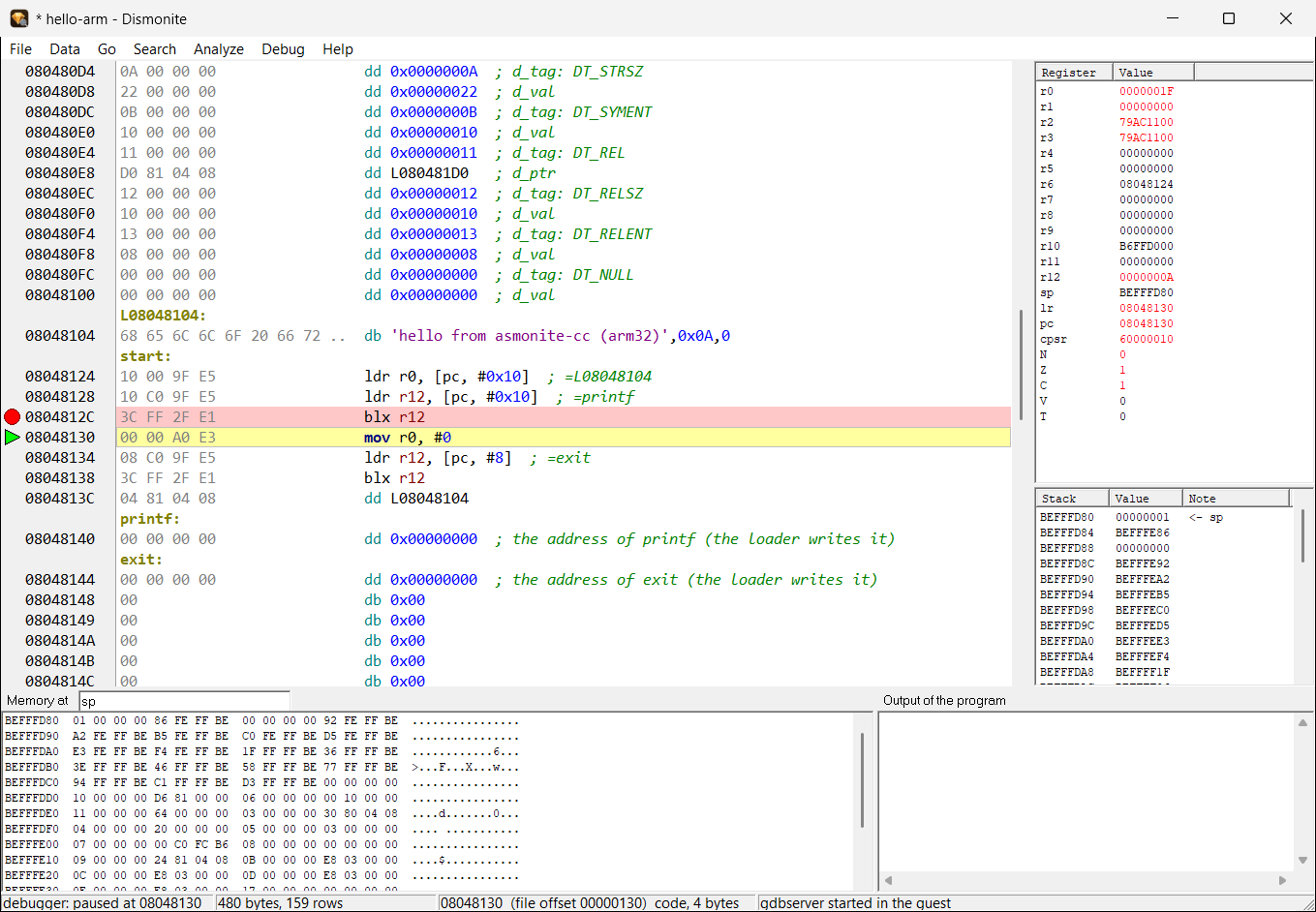
hello-arm im Raspberry-Pi-Gast, nach Step Over über printf – ARM-Register, Stack ab sp und der Speicher dort.
ARM Linux: hello-arm in the Raspberry Pi guest, after a step over printf – ARM registers, the stack from sp and the memory there.
Für jede einzelne Aufgabe gibt es gute Werkzeuge. Asmonite bringt sie für den Alltag mit Assembler zusammen – mit einer Bedienung und ohne Installation.
There are good tools for every single task. Asmonite brings them together for everyday assembly work – one way to operate them and no installation.
| Aufgabe | Asmonite + Dismonite | Übliche Werkzeugkette |
|---|---|---|
| Task | Asmonite + Dismonite | Usual tool chain |
| Quelltext schreiben | ✓ Editor mit Hervorhebung | Texteditor |
| Write source | ✓ editor with highlighting | text editor |
| Übersetzen | ✓ eingebaut, dazu asmoc | eigenes Programm (z. B. NASM) und Linker |
| Assemble | ✓ built in, plus asmoc | separate program (e.g. NASM) and linker |
| Windows-Programme debuggen | ✓ auf Quellzeilen und ohne Quelltext | eigener Debugger (z. B. x64dbg) |
| Debug Windows programs | ✓ on source lines and without source | separate debugger (e.g. x64dbg) |
| DOS-Programme debuggen | ✓ QEMU + FreeDOS, startet von selbst | Emulator mit eigenem Debugger, von Hand eingerichtet |
| Debug DOS programs | ✓ QEMU + FreeDOS, starts by itself | emulator with its own debugger, set up by hand |
| ARM-Linux-Programme debuggen | ✓ Gast wird per Skript eingerichtet | QEMU, gdbserver und gdb von Hand |
| Debug ARM Linux programs | ✓ the guest is set up by a script | QEMU, gdbserver and gdb by hand |
| Windows-on-ARM-Programme debuggen | ✓ Server asmodbg auf dem ARM-Rechner, Steuerung aus Dismonite | Remote-Debugger und Entwicklungsumgebung auf dem ARM-Rechner einrichten |
| Debug Windows on ARM programs | ✓ server asmodbg on the ARM computer, controlled from Dismonite | set up a remote debugger and a development environment on the ARM computer |
| x64- und ARM64-Programme | ✓ Assembler, Disassembler mit Export und Debugger | getrennte Werkzeuge je Architektur |
| x64 and ARM64 programs | ✓ assembler, disassembler with export and debugger | separate tools per architecture |
| Befehle nachschlagen | ✓ F1 auf der Zeile: Befehl, Windows-Funktion, Interrupt, Fehlermeldung | Handbuch oder Suchmaschine in einem anderen Fenster |
| Look instructions up | ✓ F1 on the line: instruction, Windows function, interrupt, error message | manual or search engine in another window |
| Disassemblieren | ✓ Export, der wieder dieselbe Datei ergibt | Disassembler; der Export muss meist nachbearbeitet werden |
| Disassemble | ✓ export that gives the same file again | disassembler; the export usually needs rework |
| Installation | ✓ keine – ein ZIP, unter 2 MB | mehrere Programme |
| Installation | ✓ none – one ZIP, under 2 MB | several programs |
Die wichtigsten Befehle auf einen Blick. Die Debug-Tasten sind in beiden Programmen gleich.
The most important commands at a glance. The debug keys are the same in both programs.
| Taste | Asmonite und Dismonite | |
|---|---|---|
| Key | Asmonite and Dismonite | |
| F1 | Befehlsinfo: Befehl, Funktion, Interrupt, Direktive, Fehlermeldung | Instruction info: instruction, function, interrupt, directive, error message |
| F5 | Haltepunkt umschalten | Toggle breakpoint |
| F9 | Starten / Fortsetzen | Start / continue |
| F8 / F7 | Step Over / Step Into | Step over / step into |
| F4 | Run to Cursor | Run to cursor |
| Strg+F2 | Debug-Sitzung beenden | End the debug session |
| Strg+F9 | Assemblieren (nur Asmonite) | Assemble (Asmonite only) |
| Strg+F · F3 | Suchen · weitersuchen | Find · find next |
| Strg+H | Ersetzen (Asmonite) | Replace (Asmonite) |
| Strg+G | Gehe zu Zeile (Asmonite) / Adresse (Dismonite) | Go to line (Asmonite) / address (Dismonite) |
| Strg+Z / Strg+Y | Rückgängig / Wiederholen (Asmonite) | Undo / redo (Asmonite) |
| Taste | Dismonite | |
|---|---|---|
| Key | Dismonite | |
| C | als Code markieren | mark as code |
| B W D Q | Byte, Word, Dword, Qword | byte, word, dword, qword |
| A / U | ASCII- / UTF-16-Text | ASCII / UTF-16 text |
| ; / Enter | Kommentar / Kommentarzeile davor | Comment / comment line before |
| N | Label umbenennen | Rename label |
| Strg+R | Verweise auf diese Stelle | References to this place |
| Strg+F3 | nächster Text | Next string |
| Alt+← / Alt+→ | zurück / vor | Back / forward |
Ein ZIP-Archiv – entpacken und starten, ohne Installation.
One ZIP archive – unpack and start, no installation.
Asmonite (Editor, Assembler, Debugger), Dismonite (Disassembler und Debugger), asmoc (Assembler auf der Kommandozeile), die QEMU-Skripte für FreeDOS und Raspberry Pi OS, die Debug-Server asmodbg, asmodbg64 und asmodbgx64 (Windows on ARM, ARM64, x64), die Befehlsinfo (Deutsch und Englisch) und Beispiele für Windows (x86, x64), DOS und ARM (Thumb-2, ARM64).
Asmonite (editor, assembler, debugger), Dismonite (disassembler and debugger), asmoc (assembler on the command line), the QEMU scripts for FreeDOS and Raspberry Pi OS, the debug servers asmodbg, asmodbg64 and asmodbgx64 (Windows on ARM, ARM64, x64), the instruction info (German and English) and examples for Windows (x86, x64), DOS and ARM (Thumb-2, ARM64).
Asmonite.ini neben der EXE, Dismonite seine Markierungen in <programm>.dmon neben dem untersuchten Programm.127.0.0.1. Zum Debuggen auf Windows on ARM verbindet es sich nur mit dem Rechner, den du angibst; „Search LAN“ fragt dafür einmalig per UDP im lokalen Netz.Asmonite.ini next to the EXE, Dismonite its marks in <program>.dmon next to the examined program.127.0.0.1. To debug on Windows on ARM it connects only to the computer you name; “Search LAN” asks the local network once by UDP for that.certutil -hashfile Asmonite-0.5.0.zip SHA256 – sie muss mit dem Wert oben übereinstimmen.certutil -hashfile Asmonite-0.5.0.zip SHA256 – it must match the value above.