ESP32: assembler, aBelle and WiFi over the USB cable

Write Xtensa assembly or aBelle, put it on the board and debug it step by step – without a JTAG probe, without esptool, without ESP-IDF.

The original ESP32 from Espressif has two Xtensa LX6 cores at 240 MHz and no USB port of its own. Asmonite assembles its code (.target esp32) and compiles programs in the language aBelle for it, loads a program into the RAM or writes it into the flash, and debugs it over the USB cable of the board: breakpoints, steps, registers, memory. On top come a console with files in the flash and the WiFi: an aBelle program connects to a network, gets an address by DHCP and speaks UDP and TCP, also while the debugger holds it at a breakpoint.

Tested with an ESP32 DevKit V1 (ESP32-D0WD, CP2102, 4 MB of flash, LED at GPIO 2) and a board with an ESP32-WROVER (CH9102, 8 MB of flash). The full guide is in the source repository as docs/en/esp32.md.

What Asmonite does with the ESP32

AssemblerXtensa with register windows, a literal pool and the 16-bit instructions; code in the IRAM, data behind .data in the DRAM.
aBelleA small language with the look of Python; target "esp32" compiles for the same RAM, the debugger shows the source.
DebuggerOver the serial port: breakpoints, F7/F8, pausing a running program, registers, memory, the output in the tab Serial.
FlashA program as an image of the boot ROM at 0x1000; it starts by itself after every reset.
ConsoleA file system in the flash, a window for the files, starting programs and an autostart.
WiFiStation with WPA2 or open, DHCP, DNS, ping, UDP, TCP (client and server), mDNS (esp32.local).

Connect and start

  1. Plug in the board. A board with an ESP32 and a USB serial chip (CP2102 or CP2104, CH340, CH9102, CH343, FTDI). In the Device Manager it shows as a COM port. Windows brings the driver of most of these chips, else it comes from the maker of the chip.
  2. Test the connection. Debug > Debug targets > ESP32 > Test the connection shows the COM port, the MAC address and the flash, for example "flash 4 MB (Boya, JEDEC id 68 40 16)". The flash chip tells its size itself, as with esptool flash_id.
  3. Start. Open examples\esp32\blink_ram.asm and press F7: Asmonite puts the chip into the download mode, loads the program and stops at _start. F7 and F8 take a step, F9 runs, F5 sets a breakpoint, Debug > Pause stops.

The download mode. The boot ROM waits for commands on UART0 when GPIO 0 is low at a reset. The boards do that over the lines DTR and RTS of the USB serial chip; Asmonite does it as esptool does and checks the first line of the boot ROM after each reset. On some boards that takes many attempts, because the capacitor at EN is too small. If the board does not get there within 10 seconds, Asmonite asks you to hold BOOT down. A capacitor of about 10 µF between EN and GND fixes it for good.

921600 baud. Big transfers go eight times as fast as at 115200: the flash over the boot ROM, a program of 16 KB or more under the debugger, files of 16 KB or more. Asmonite checks the rate with a short exchange and falls back to 115200 if the board does not manage it. A program of 98 KB loads in a little over 6 seconds. Before the program runs, the rate is 115200 again. The environment variable ASMONITE_ESP_BAUD sets another rate.

Debugging without JTAG

F9 or F7 puts the chip into the download mode, the boot ROM loads Asmonite's debug monitor (a little over 2 KB at 0x4009E000), and the monitor loads the program and starts it at _start. It points VECBASE at its own vector table: break 1,15 (a breakpoint), the step of ICOUNT and every exception land there. It saves the registers and answers Asmonite's commands over UART0. It has the handlers of the register windows, so a chain of calls with call4, call8 and call12 deeper than the 64 registers hold works too.

Pause and stop. Debug > Pause stops a running program where it is, also in an endless loop. For that Asmonite sends a byte over UART0; the monitor routes the interrupt of the UART to the NMI of the core, above the interrupt level 5 the program runs at. Stop (Ctrl+F2) ends the session at once.

Exceptions. An illegal instruction, a load from an address without memory or a byte store into the IRAM stops the program at the instruction, with the cause in the output window. The core reads and writes the IRAM in words of 32 bits only: l32i and s32i work, l8ui and s8i do not.

Data in the DRAM: .data

Texts, tables and buffers go behind .data: these lines land in the DRAM from 0x3FFB0000 on, where the core reads and writes bytes, halfwords and words. .code switches back to the code.

lit_text: dd text           ; the address in the DRAM, for l32r

_start:
    l32r  a3, lit_text
    l8ui  a2, a3, 0           ; a byte of the text
    ...

.data
text:   db 'Hello, world!', 13, 10, 0
buffer: resb 64             ; room, filled with zeros when it is loaded

The debugger writes the bytes of .data into the DRAM after the code; a program for the flash has them as a second segment of the image, which the boot ROM copies at every start. The stack starts at 0x3FFC0000 and grows down; data that reach into it are an error.

RAM, flash and the serial output

.target esp32F9 loads the program into the IRAM from 0x40080000 (120 KB up to the monitor). Quick to try out; after a reset whatever is in the flash runs again.
.target esp32 flashF9 writes the program into the flash as an image of the boot ROM at 0x1000 and then debugs it in the RAM. It starts by itself after every reset. An image that does not fit into the flash of the board Asmonite refuses.
Write to Flash and Run (Shift+F9)The same for a program with .target esp32: the same source without a change into the RAM (F9) or into the flash (Shift+F9).

A program that the boot ROM starts from the flash has to switch off the watchdogs itself, else the chip resets after a few seconds; examples\esp32\blink_flash.asm shows how with a few lines at _start.

The tab Serial. What the program writes into UART0 comes out at the COM port, at 115200 baud. Under the debugger the monitor shares the port with the program, and the output shows in the tab Serial next to the output window. Without the debugger the tab is a small terminal: Connect, an input line and Reset, which resets the chip over RTS without closing the port. Otherwise the terminal leaves the lines DTR and RTS off, so that a program in the RAM is not gone when the port opens.

The console and its files

examples\esp32\console.asm makes the board a small computer with a file system in the flash, from 2 MB to the end of the flash: 2 MB on a flash of 4 MB, 6 MB on one of 8 MB. Any terminal program works with it (ls, cat, put, rm, df, format, run, load, boot, help), and Debug > ESP32 Board Files shows its files in a window.

Write Console to FlashWrites the console into the flash over the boot ROM; the first time Format makes the file system. The head line names the flash of the board.
Upload File, Download, DeleteFiles of any kind between the PC and the board, each checked by its CRC-32: 100 KB up in a little under 4 seconds, down in 2.
Upload This Program, Run, AutostartCompiles the program in the editor (assembly or aBelle) and uploads it as a file; Run starts it, Autostart starts it after every reset.
Reset BoardResets the board and keeps it in the console (as BOOT or a key in the terminal right after the reset do).
Erase FlashErases the whole flash as on a new board (8 to 17 seconds on 4 MB). Then the boot ROM says "flash read err, 1000" until something is in the flash again.
Install WiFiPuts the WiFi onto the board (see below).
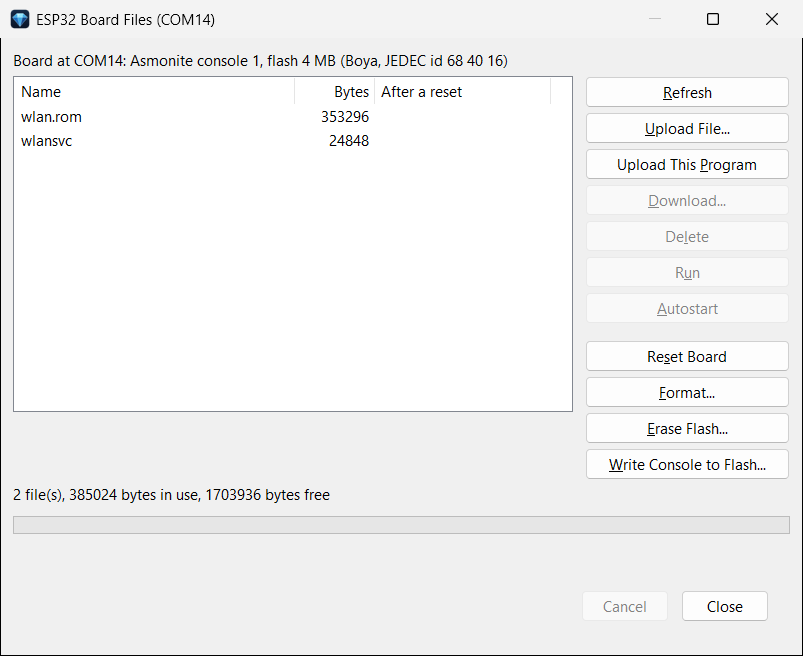
Asmonite: the window ESP32 Board Files with the files wlan.rom and wlansvc on a board with 4 MB of flash
The window ESP32 Board Files: at the top the flash of the board, in the list the files of the WiFi after Install WiFi.

A program for F9 fits into the console as it is: its code may take 0x40080000..0x40097FFF, its data 0x3FFB0000..0x3FFCFFFF. The console does not run under the debugger, because the debug monitor takes every byte on UART0 as a pause.

The WiFi

The WiFi of the ESP32 is in libraries of Espressif without source. Asmonite links them once with its own linker into a fixed file, wlan.rom, and brings a small service, wlansvc, which starts them and offers simple functions to programs. No ESP-IDF is needed for it.

  1. Set it up once per board. Debug > ESP32 Board Files (the console in the flash, the file system formatted), then Install WiFi: the part for the flash (330 KB at 0x100000) goes into the flash over the boot ROM, wlan.rom and wlansvc into the files. This takes about 25 seconds.
  2. Enter the network. In examples\abelle\esp32\inc\network.abel enter the name and the password of your network (empty for an open network, else WPA2, 2.4 GHz).
  3. Start. Open for example ntp.abel and press F9. The program loads the service from the files of the board itself at its first WiFi call, with F9 as with run ntp in the console or as the autostart.

Debugging while the WiFi runs. The service and the WiFi run on the second core of the ESP32, the program on the first. The debugger stops the first one only: while the program stands at a breakpoint, the station stays connected, and what comes in waits in a buffer of the service (6 frames). So you can go through a DHCP exchange or a TCP connection line by line.

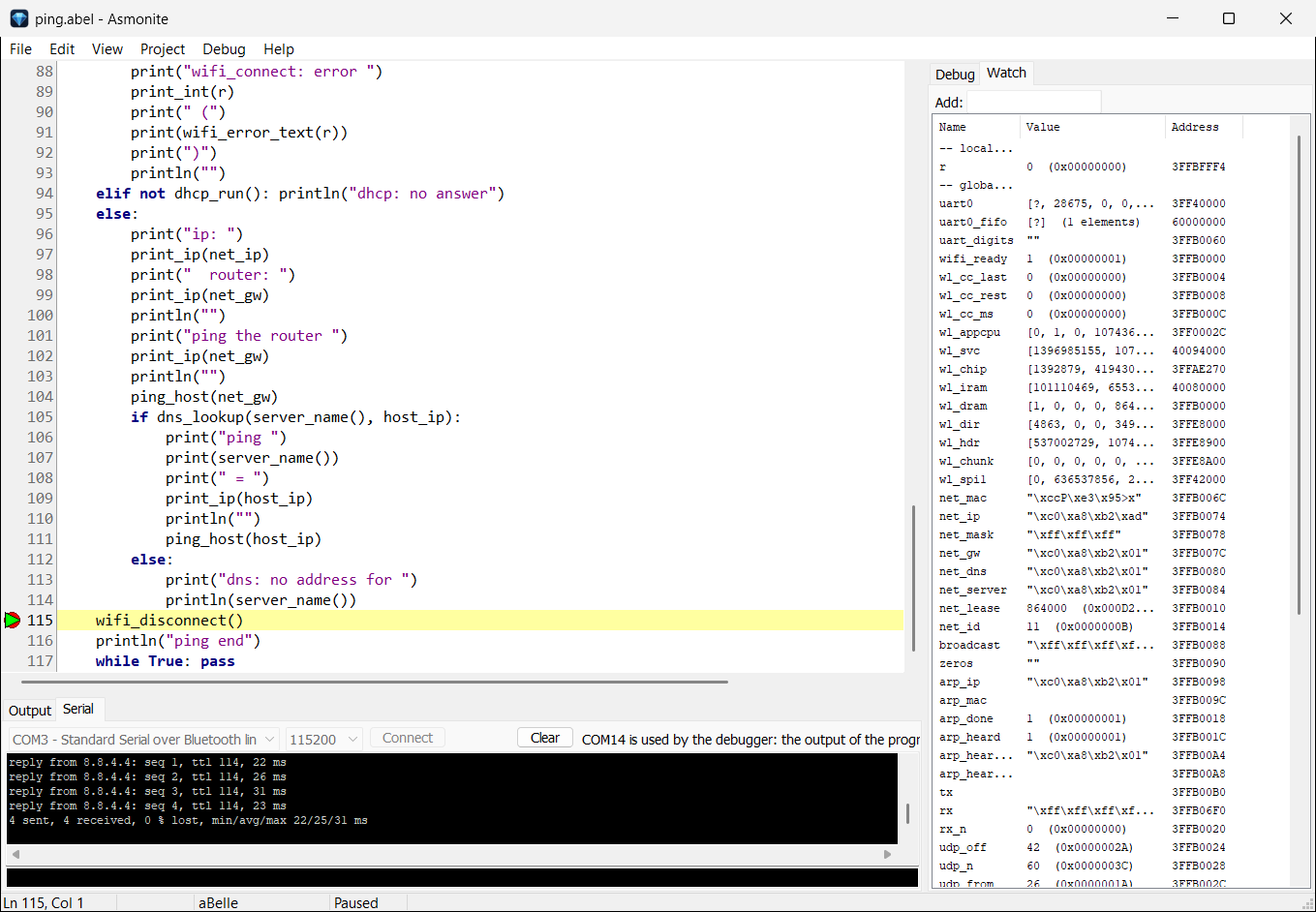
Asmonite: ping.abel on the ESP32 at a breakpoint after the pings, the replies in the tab Serial, the variables of the network in Watch
ping.abel at a breakpoint after the pings: the connection stays up, in the tab Serial the replies, on the right the variables of the IP stack (address, mask, router, lease).
FunctionWhat it does
wifi_scan, wifi_connect, wifi_statusfind networks, connect (open or WPA2), read the state
wifi_send, wifi_recvEthernet frames out and in
dhcp_runget an address, the mask, the router and the DNS server from the router
dns_lookupturn a name into an address
ping_sendsend a ping (the board answers pings to it by itself)
udp_send, net_recvUDP
tcp_connect, tcp_listen, tcp_accept, tcp_send, tcp_recv, tcp_closeTCP, one connection at a time, as a client or a server
net_set_name, mdns_startthe name of the board: the router learns it by DHCP, mDNS answers name.local (ping esp32.local)
wifi_error_textan error as a sentence, for example the hint to Install WiFi when the files are missing

The functions are in inc\wifi.abel, inc\net.abel and inc\tcp.abel, written in aBelle: you can read DHCP, DNS, ARP, ICMP, UDP, TCP and mDNS there and follow them in the debugger.

The examples

In examples\esp32 are the examples in assembly: blink, hello_uart (each for the RAM and the flash), clock (the core at 80, 160 and 240 MHz) and the console. In examples\abelle\esp32 are the examples in aBelle: blink, hello_uart, chipinfo, clock, timer, dice, reaction, sieve, temperature, and for the WiFi scan, dhcp, dns, ping, wol, arpscan, ntp, udpecho, httpget, webserver and telnetd. The registers they use are in their comments, with the source.

All examples with a description →

How the memory is used

AreaWhat is there
flash 0x001000the console (or the program of Write to Flash and Run)
flash 0x100000 .. 0x152000the part of the WiFi for the flash (code and constants, through the cache)
flash 0x200000 .. endthe file system of the console
IRAM 0x40080000 .. 0x40097FFFthe program (with WiFi: its code up to 0x40093000)
IRAM 0x40094000the service wlansvc, above it wlan.rom
IRAM 0x4009C000 / 0x4009E000the console / the debug monitor
DRAM 0x3FFB0000 ..the data of the program (with WiFi: up to 0x3FFD8000), the stack from 0x3FFC0000 down
DRAM 0x3FFD0000the data of the console
DRAM 0x3FFD8000 .. 0x3FFDFFFF, 0x3FFE8000 ..the data of the WiFi and its heap

When something does not work

Message or signWhat to do
"No board with an ESP32 is plugged in"The USB cable (some carry power only), the driver of the USB serial chip
"… does not go into the download mode by itself: hold the BOOT button"Hold BOOT down until the program runs
"COM14 is open in another program"Close the terminal, then F9 again
"The console does not answer" (Board Files)A program runs (Reset Board), or the console is not in the flash (Write Console to Flash)
"flash read err, 1000" at the COM portThe flash is empty (a new or erased board): Write Console to Flash
"wifi_connect: error 2041 (wlan.rom or wlansvc is not on the board …)"Install WiFi in Board Files
"… the access point said no" / "no answer of the access point"The password in inc\network.abel, the name of the network, a network on 2.4 GHz in reach
The board starts again every few secondsA program in the flash that does not switch the watchdogs off
"Stopped: exception at …: load/store error"A byte access to the IRAM, or an address without memory

What is not (yet) there

Next

The examples

Every example for the ESP32: what it shows, what it needs, how it starts.

To the examples →

aBelle

The language with the look of Python, for the ESP32 and Windows (x86, x64).

The aBelle page →

Instruction reference

Every Xtensa instruction with its bit encoding and pseudo code, for the ESP32 and the ESP32-S3.

Xtensa →