Write Xtensa assembly or aBelle, put it on the board with F9 and debug it step by step – without a debug probe, without OpenOCD, without ESP-IDF.
The ESP32-S3 from Espressif has two Xtensa LX7 cores (240 MHz) and a USB port that is a serial port and a JTAG debugger at the same time. Asmonite assembles its code (.target esp32s3) and compiles programs in aBelle for it (target "esp32s3"). Everything the original ESP32 has in Asmonite is here too: the console with files in the flash, F9 and debugging over the console without a reset, the menu Board and the WiFi as a service of the console, with WPA2, DHCP, DNS, ping and TCP.
Tested with a board with two USB-C ports and an RGB LED WS2812 at GPIO 48 (one port goes to the chip, the other one to UART0 over a CH343). Other boards whose USB port goes straight to the chip (GPIO 19 and 20) should work the same way. The full guide is in the source repository as docs/en/esp32s3.md.
| Assembler | Xtensa with register windows, a literal pool and the 16-bit instructions; .target esp32s3 for the RAM, .target esp32s3 flash for the flash. |
| aBelle | target "esp32s3", the same compiler abelle_esp32.exe as for the ESP32; the debugger shows the source. |
| F9 | Into the RAM over the console and started: no download mode, no reset. The output in the tab Serial, Stop ends the program. |
| Debugger | Over the USB JTAG of the chip: breakpoints, steps, pause, registers, memory; with the console without a reset. |
| Console | A file system in the flash (a little over 14 MB on 16 MB of flash), the menu Board, programs as commands. |
| WiFi | A service of the console on core 1: wlan set, open networks and WPA2, DHCP, DNS, ping, UDP, TCP; the WiFi examples of the ESP32. |
examples\abelle\esp32s3\hello_usb.abel and press F9: "Hello, world!" and a counter in the tab Serial. Stop ends it. With a breakpoint (F5) F9 starts the debugger.A firmware with its own USB. If the board is not "USB JTAG/serial debug unit" but some other Espressif device (its firmware uses the USB port itself, for example an Arduino sketch with USB CDC or MicroPython), hold BOOT, press RST and let go of BOOT once: the chip then waits in its boot ROM and shows its USB JTAG. Asmonite says so when it finds such a board. Once the console of Asmonite is in the flash this is not needed any more.
Updates by themselves. Before F9 and before debugging, Asmonite compares the console in the flash with its own. When it comes from another version of Asmonite, Asmonite writes its own (about 2 seconds), then another WiFi package. The files and the network of the board stay.
With the console. With a breakpoint, F7 or F8 the debugger starts without a reset: Asmonite connects to the USB JTAG as it is, the console calls its host dbg_host as a program, and the core halts there; the debugger loads the program over JTAG and starts it from there. After the end of the program (also by exit() or an exception that the console catches) or Stop the console is back; the next session begins after half a second.
Without the console and for a program for the flash, the debugger resets the chip into the download mode of its boot ROM over the USB serial port (the lines DTR and RTS, as esptool does), stops core 0 there, loads the program to 0x40378000 and runs it or stops at _start. Every session starts on the same clean chip this way: the core at 40 MHz, the watchdogs off, the peripherals as after a reset.
Then: steps (F7, F8), breakpoints (F5), registers a0 .. a15, pc, ps, sar, windowbase, windowstart and the loop registers, memory (also as code). The stack pointer a1 starts at 0x3FCAFFE0. If _start begins with entry, the program comes as from the console (callx8, with register windows) and retw ends the session with its a2; without entry it comes as with call0 and ret ends it.
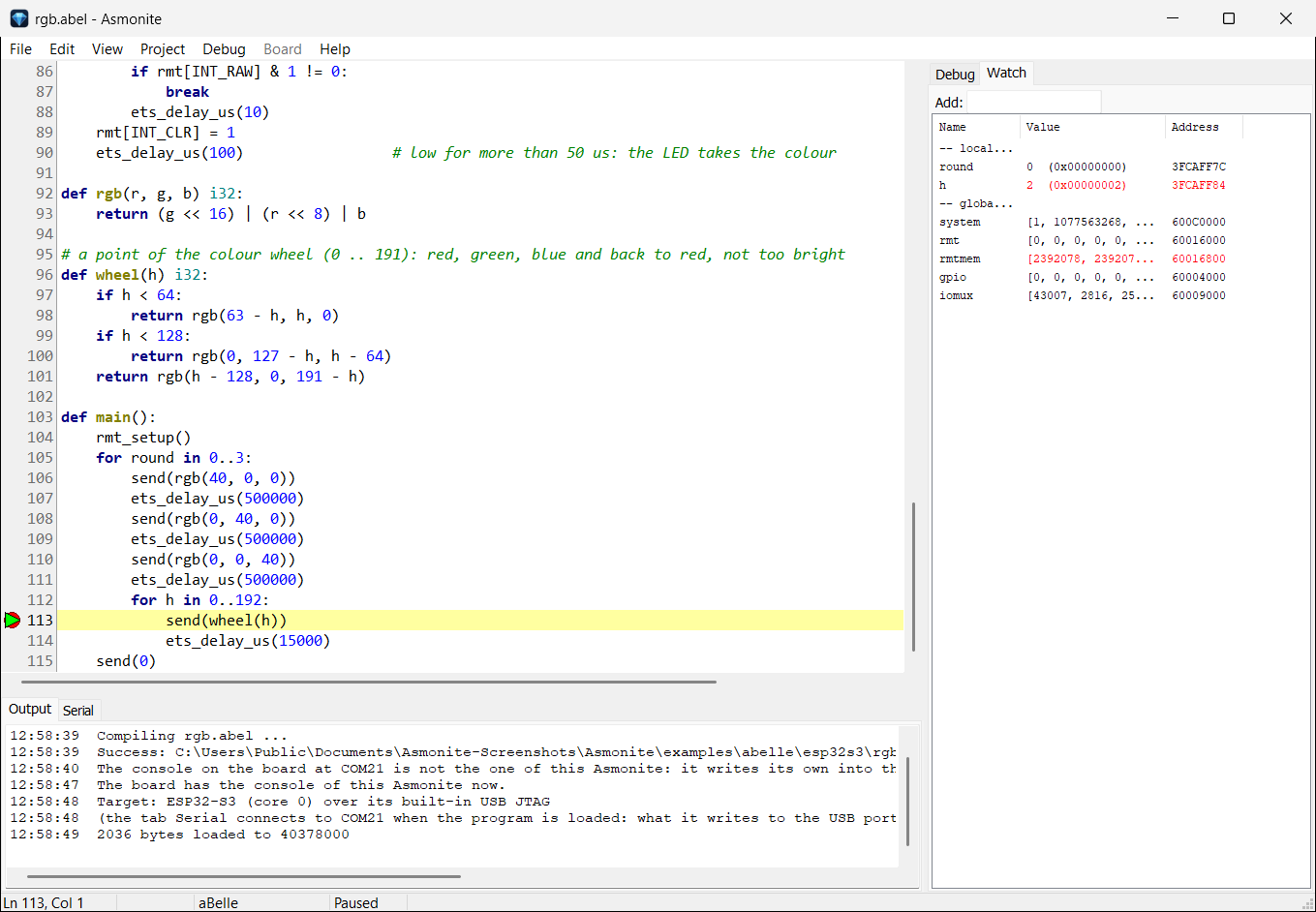
rgb.abel at a breakpoint in the colour wheel: on the right round and h, the registers of the RMT and its RAM; below in the tab Output how Asmonite replaced the older console of the board by itself first.
.target esp32s3 ; or: .target esp32s3 flash .arch xtensa .imagebase 0x40378000 _start: ...
.target esp32s3 | The program in the RAM from 0x40378000 on: the assembler takes it up to 0x403BFFFF (288 KB), above it lies the console. The normal window, which aBelle uses and with which the WiFi runs: code up to 0x4038FFFF (96 KB), data 0x3FCA0000 .. 0x3FCAFFFF. |
.target esp32s3 flash | F9 or F7 write the program into the flash at the address 0 over the serial port of the chip, as an image of the boot ROM; then the debugger debugs it in the RAM. After RST the boot ROM starts it by itself. This replaces what was in the flash before, the console too. |
A program that the boot ROM starts from the flash has to switch off the watchdogs itself (timer group 0 and 1, the RTC watchdog and the super watchdog) and set the clock if it counts time: from the flash the boot ROM leaves the core at 20 MHz. examples\esp32s3\rgb_ws2812_flash.asm shows both with a few lines at _start.
The serial output. The USB port of the chip has two parts: the JTAG of the debugger and a serial port (in the Device Manager "USB Serial Device"). What a program writes to the peripheral USB Serial/JTAG (0x60038000) comes out on that COM port, also while the debugger has the JTAG; the tab Serial shows it. The baud rate does not matter. In aBelle, inc/usb.abel writes text and numbers there.
Bytes in the RAM. The RAM of the program is one memory on two buses. At its IRAM address (0x40378000 ..) the core reads and writes words only; on the data bus the same byte is 0x6F0000 lower (0x3FC88000 for 0x40378000), and bytes work there.
A program in aBelle with target "esp32s3" is compiled by abelle_esp32.exe into the code for the RAM from 0x40378000 on (up to 96 KB) and the data from 0x3FCA0000 on (up to 60 KB, the same RAM over the data bus; above it the stack and the WiFi). F9 starts it and debugs it in its source: breakpoints, F7/F8 line by line, variables under the mouse and in the window Watch. Functions of the boot ROM are made known with at and their address as on the ESP32; on the S3 they are elsewhere (ets_delay_us at 0x40000600, on the ESP32 at 0x40008534).
The RGB LED: rgb.abel. The example lights the RGB LED of the board (a WS2812 at GPIO 48) red, green and blue and once around the colour wheel, three rounds, then the LED goes off and the program returns to the console. A WS2812 needs pulses of 0.35 and 0.7 µs; the RMT of the chip makes them, counting the 40 MHz of the crystal, so whatever the clock of the core is. The registers are in the head of the file, with their sources.
A large program without the WiFi. When an aBelle program needs more than 96 KB of code or 60 KB of data, abelle_esp32 takes the large window (code up to 156 KB, data up to 128 KB) and says so when it translates ("it runs without the WiFi"). The console then stops the WiFi first and starts it again in the background afterwards.
examples\esp32s3\console.asm is the console of the ESP32 for the S3: the same commands (ls, cat, put, rm, df, format, run, load, boot, wlan, help), the same file system in the flash from 2 MB to its end and the same packets for Asmonite. It speaks over the USB port of the chip: any terminal program on the COM port of the chip.
The menu Board works with the S3 as with the ESP32 (Asmonite takes the S3 when no board with a USB serial chip is plugged in):
| Board > Prepare Board | Writes the console into the flash over the boot ROM (at the address 0) and makes the file system when there is none. |
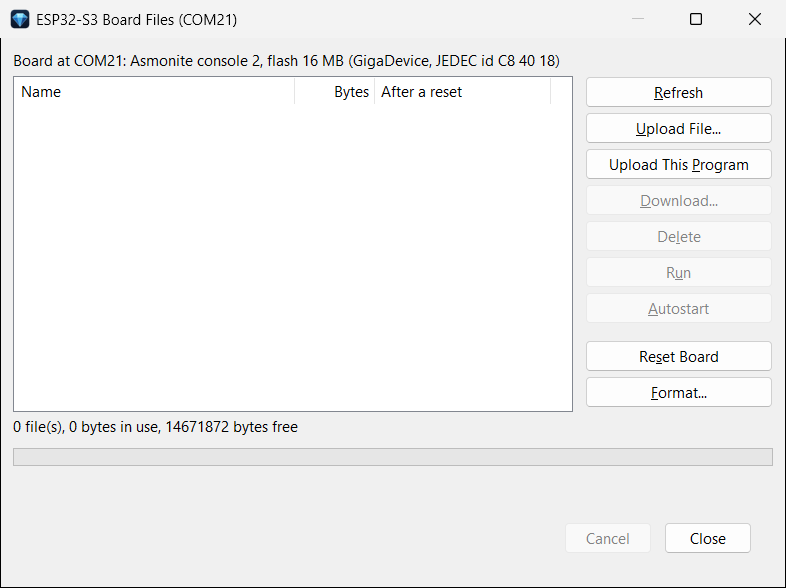
| Board > Files | The window ESP32-S3 Board Files: Upload File, Download, Delete, Upload This Program, Run, Autostart, Reset Board and Format. Upload This Program takes a program with .target esp32s3 or target "esp32s3" and refuses one for the ESP32. |
| Board > Set This Program as Autostart | Uploads the program in the editor to the board and starts it after every reset. |
| Board > Advanced | Write to Flash and Run (the program takes the place of the console; Asmonite asks first), Erase Flash, Install WiFi Again (the WiFi package anew, seldom needed). |
When a program ends, the console is back, as on the ESP32: retw (it says Program ended (code n)), exit(code) by callx8 to 0x403C0800, an exception or a break (Program stopped: …), or Ctrl+C: the button Stop in the tab Serial, also with the interrupts off. A program from the console may use all of the RAM of the programs: code 0x40378000 .. 0x403BFFFF, data over the data bus 0x3FC88000 .. 0x3FCCFFFF; with the WiFi the upper part of it belongs to the WiFi.
Functions of the console for programs as on the ESP32, from 0x403C0800 on: exit, version, put_char, get_char, poll_char, print, millis, file_size, file_read, file_write, flash_read, args, 4 bytes each (the table is on the page of the ESP32). Programs as commands too, as there: name args starts name or name.bin of the files. In aBelle: include "inc/console.abel", example runs.abel.
After a reset the console waits 3 seconds before an autostart (on the ESP32 one): with the reset the USB port goes away for a moment and comes back, only then can a terminal send a key. A reset over RTS (as Reset Board) resets the chip only, the USB port stays: a terminal may stay open.
The WiFi of the S3 comes from the libraries of Espressif, with an OS layer of its own in assembler in place of FreeRTOS, as on the ESP32. A service runs on core 1 while a program or the console runs on core 0; the debugger stops core 0 only, the WiFi goes on.
wlan set in the tab Serial, then its name and password (open or WPA2, 2.4 GHz), as on the ESP32. The console keeps the name and the key, not the password (about 2.3 seconds). With a stored network it connects in the background at each start.examples\abelle\esp32s3\ntp.abel and press F9. When the WiFi package is missing on the board or does not match, Asmonite first writes it over the console (about 300 KB, about 8 seconds). The program connects with wifi_connect_saved(), ends with wifi_done() and returns to the console; the servers run until Stop.The examples are the ones of the ESP32: scan, dhcp, ping, dns, ntp, httpget, webserver, udpecho, wol, arpscan and telnetd (the files of the board through the MMU of the S3, led switches the RGB LED). They write their text over the USB port of the chip (inc/usb.abel in place of inc/uart.abel); net.abel and tcp.abel are the ones of the ESP32. While the console uses the flash, it parks core 1: files can be written while the WiFi runs, a connection stays up. For WPA2 the service unwraps the group key itself (AES key unwrap of RFC 3394): the ROM of the S3 has no function for it, unlike the one of the ESP32.
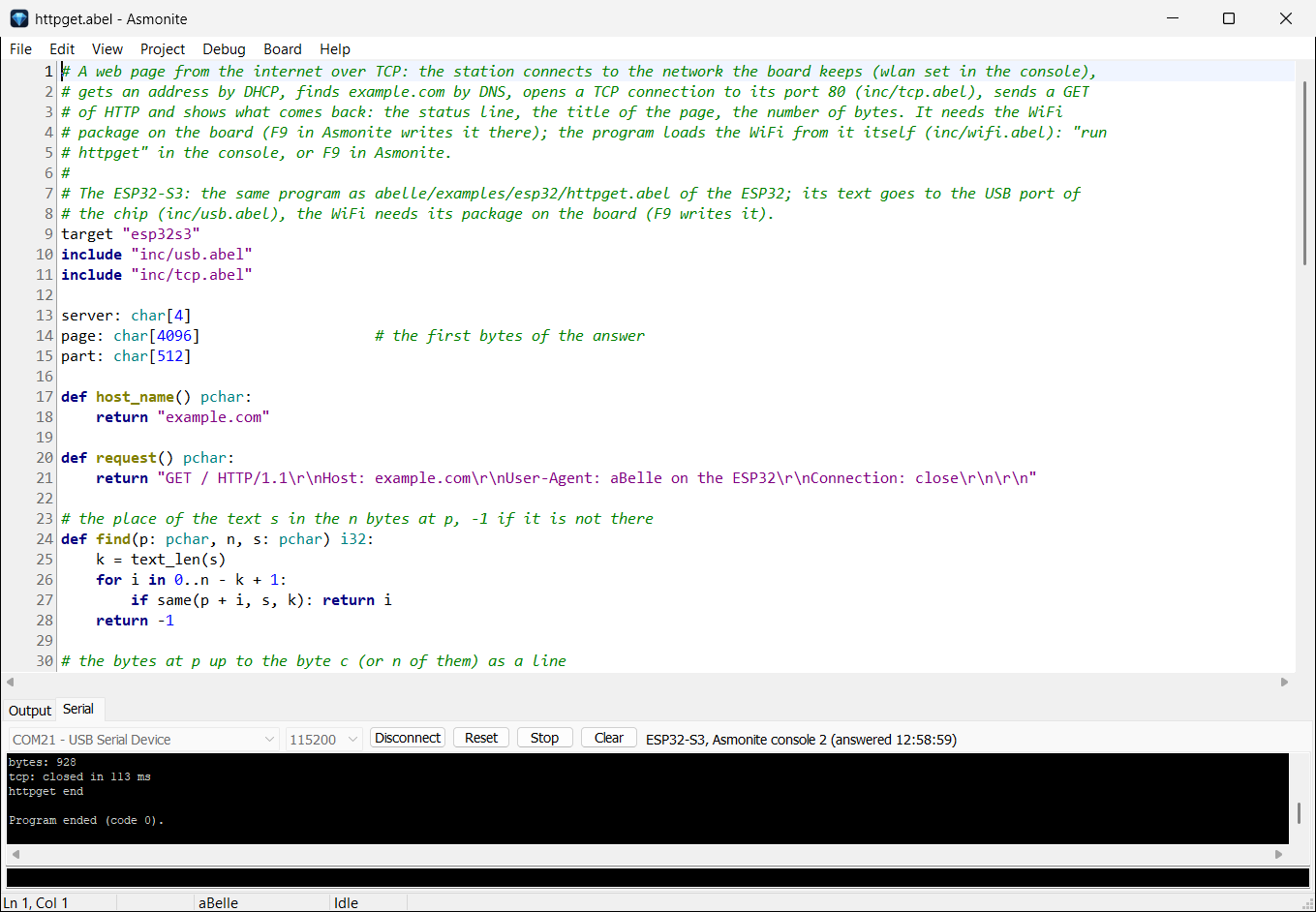
httpget.abel fetched example.com over the connection of the console, in the tab Serial the end of its output.
The code bus and the data bus are the same RAM, 0x6F0000 apart.
| Area | What is there |
|---|---|
flash 0x000000 | the console (or the program of Write to Flash and Run) |
flash 0x0FE000, 0x0FF000 | the network of the board (wlan set): its name and key |
flash 0x100000 .. 0x1FFFFF | the WiFi package: the library, a head at 0x1F0000, behind it the parts of wlan.rom for the RAM and wlansvc |
| flash from 2 MB .. end | the file system of the console |
0x40378000 .. 0x4038FFFF | code of the program (in the large window up to 0x4039EFFF, then without the WiFi) |
0x3FCA0000 .. 0x3FCAFFFF | data of the program, the stack in its top 4 KB |
0x403A0000 .., data from 0x3FCB6000 | the service wlansvc |
0x403A8000 .., 0x3FCBC000 .. | wlan.rom |
0x3FCC1000 .. 0x3FCCFFFF | heap of the WiFi |
0x403C0000 .., data from 0x3FCD8000 | the console (its functions from 0x403C0800) |
0x3FCDF000 .. 0x3FCE7FFF | buffers of the WiFi, stack of core 1 |
| Message or sign | What to do |
|---|---|
| "an Espressif chip is plugged in, but its firmware uses the USB port itself" | Hold BOOT, press RST, let go of BOOT; then F9 again |
| "No ESP32-S3 with its USB JTAG (303A:1001) is plugged in" | The other USB port of the board (the one at the chip), or Debug targets > ESP32-S3 > Set up the USB JTAG |
| "COM13 is open in another program" | Close the terminal, then F9 again |
| The colours of the RGB example in assembly are wrong or white | The times of the WS2812 are in cycles there: the program must run at 40 MHz (rgb.abel uses the RMT and does not depend on the clock) |
| The board restarts every few seconds | A program in the flash that does not switch the watchdogs off; F9 with a program that does |
ee.*) of the ESP32-S3, programs in the external flash or PSRAM (only the internal RAM), Bluetooth.The examples for the ESP32-S3 in assembly and aBelle, with the RGB LED and the WiFi.
The original ESP32: the console, its functions, the WiFi and its functions in detail.
Every Xtensa instruction with its bit encoding and pseudo code, for the ESP32 and the ESP32-S3.